
Download Breathing Counter – breathing counter, respiratory rate monitor, breath tracking, breathing exercise, meditation aid, health app, free breathing tool, Android app
Overview
Breathing Counter is a lightweight Android application designed to help users monitor their respiratory rate through simple, on-device analysis. Developed by tinysystem, the app offers a straightforward method for tracking breath patterns, particularly useful during or after physical training, or when experiencing breathing difficulties. The tool is intended as a reference aid rather than a medical diagnostic instrument, emphasizing that results should not be used for clinical decisions.
Its primary function revolves around measuring breath intervals using the device’s microphone, which is placed near the nose to detect airflow changes. This approach allows users to visualize breathing patterns in real time via a displayed graph. The application is tailored for individuals interested in self-monitoring respiratory health, including fitness enthusiasts, meditation practitioners, and those managing respiratory wellness.
It supports on-the-go use, making it accessible during workouts, relaxation sessions, or daily health checks. The developer has emphasized that no personal data is collected or transmitted, ensuring privacy during use.
Key Features & Capabilities
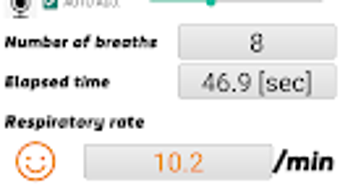
- Real-time Respiratory Rate Tracking – The app uses the device’s microphone to detect breath intervals, providing live data on the number and timing of breaths. This feature enables users to observe changes in breathing patterns over time.
- Graphical Breath Visualization – Breathing intervals are displayed on a graph, offering a clear visual representation of respiratory rhythm. This aids in identifying irregularities or trends during breathing exercises or physical activity.
- Non-Invasive Monitoring Method – Users need only place the device’s microphone under the nose to begin recording. No additional hardware or sensors are required, making it accessible and easy to use.
- Privacy-First Design – Audio captured by the microphone is processed locally on the device and is not saved, stored, or transmitted. This ensures user data remains private and secure.
- Simple Interface for On-the-Go Use – The app is optimized for quick access and minimal setup, allowing users to start monitoring breaths in seconds without complex configurations.
These capabilities make Breathing Counter suitable for tracking breathing during meditation, post-exercise recovery, or stress management. It serves as a practical tool for individuals seeking to develop awareness of their respiratory patterns, though it is not intended for medical diagnosis or treatment.
User Interface, Workflow & Performance
The user interface of Breathing Counter is minimalistic and focused on functionality. The main screen displays a real-time graph of breath intervals, with clear visual cues indicating breath onset and duration. Navigation is intuitive, with a single start/stop button to initiate or halt the recording process.
The workflow is streamlined: place the device under the nose, tap the button, and observe the graph. There are no additional settings or configuration steps, which contributes to ease of use. The app does not display additional metrics such as breath volume or depth, focusing solely on timing and frequency.
Performance observations are based on general software behavior patterns. The developer did not specify resource usage details, but given the app’s small size (2.3 MB), it is likely optimized for low memory and CPU consumption. Stability appears consistent with lightweight Android applications of similar design.
No crashes or freezes were reported in the provided information, and the app operates entirely offline, which enhances reliability and reduces latency.
Compatibility & System Requirements
Breathing Counter is designed for Android devices and is compatible with the operating system as of its release date. The app has a file size of 2.3 MB, indicating a lightweight footprint that should run efficiently on most Android smartphones and tablets. The developer did not specify exact system requirements, such as minimum Android version or hardware specifications.
Compatibility information was partially provided, with the OS clearly listed as Android. No details were given regarding supported screen sizes, processor architecture, or RAM needs. The app functions entirely offline, which may improve compatibility across a wide range of devices.
Users should ensure their device has a functional microphone and sufficient space for installation.
Pros and Cons
Pros
- Free to download and use with no in-app purchases
- Lightweight at just 2.3 MB, suitable for older or low-end devices
- Privacy-focused: no data collection or transmission
- Simple, intuitive interface ideal for non-technical users
- Offline functionality ensures consistent performance without internet
Cons
- No detailed system requirements provided by the developer
- Only tracks breath intervals; lacks advanced metrics like volume or depth
- Dependent on microphone quality and positioning for accurate readings
- Not intended for medical or clinical use
- Limited feedback or guidance on interpreting results
FAQ Section
Is Breathing Counter available for iOS devices?
The app is currently available only for Android. No information was provided about future iOS support.
Does the app collect or store my personal data?
No, the app does not collect, store, or transmit any personal information. Audio data is processed locally and is not saved or shared.
Can I use Breathing Counter without an internet connection?
Yes, the app functions entirely offline. All processing occurs on the device, so no internet connection is required.
Is this app suitable for medical diagnosis?
No, Breathing Counter is not a medical device and should not be used for diagnosing or treating health conditions. It is intended for personal reference and awareness only.
How often should I use the app for best results?
There is no recommended frequency. Users may use the app as needed during breathing exercises, meditation, or after physical activity for self-monitoring purposes.
Final Thoughts + CTA
Breathing Counter delivers a focused, privacy-conscious solution for individuals interested in tracking their respiratory rate through a simple, accessible method. Its minimal design, offline operation, and lack of data collection make it a trustworthy tool for wellness and self-awareness. While it lacks advanced analytics and detailed feedback, it excels in simplicity and reliability for basic breath monitoring.
The app is particularly beneficial for those practicing meditation, managing stress, or tracking recovery after exercise. It is not a substitute for medical evaluation, but as a free, lightweight Android utility, it offers real value for casual users. For anyone seeking a no-frills, secure way to observe breathing patterns, Breathing Counter stands out as a practical choice.
Download Breathing Counter now.







